Bank statements, accounting exports and expense sheets live in different places, so nobody has one current view of cash and profit.
PRODUCT / RDS MIS
Manage your business finances, approvals and reports in one MIS platform.
RDS MIS brings your ledger, invoices and bills, approvals, employee expenses, purchasing and stock into one system. Dashboards, a business calendar and plain-language reports are calculated live from those records.
- 22 ready-made business reports
- Multi-level approvals
- Multi-company & branches
- Bank statement & Tally import
- Role-based access & audit log
PRODUCT OVERVIEW
What is RDS MIS?
RDS MIS is a management information system built by RDS Innovations for businesses that run their numbers across spreadsheets, bank statements, accounting exports and email approvals. It keeps one ledger of income, expenses and transfers, and connects invoices, bills, payments, expense claims, purchase orders and stock to it.
Data gets in by manual entry, a phone-friendly mobile workspace, or file import. The importer recognises bank statements, cash books, Tally/ERP ledger exports and income, expense or invoice registers. It matches columns, checks totals and running balances, flags duplicates and asks only about what is unclear.
Managers then see the dashboard, calendar, budgets, receivables and payables, analytics and a library of ready-made reports. Each one is calculated from approved records for the period, branch or department they choose. Approval rules, roles and an audit log control who can do what and keep a record of it.
Problems it solves
Payments, claims and purchases get approved informally, without a record of who approved what and at which limit.
Month-end summaries are rebuilt by hand, so decisions are made on old or inconsistent figures.
Overdue invoices, upcoming bills and budget reviews are not visible in one place until they become a problem.
FEATURES & MODULES
Everything in one system, connected to one ledger.
16 modules, each taken from the working application. Select a screenshot in the gallery below to see it full size.
Business dashboard
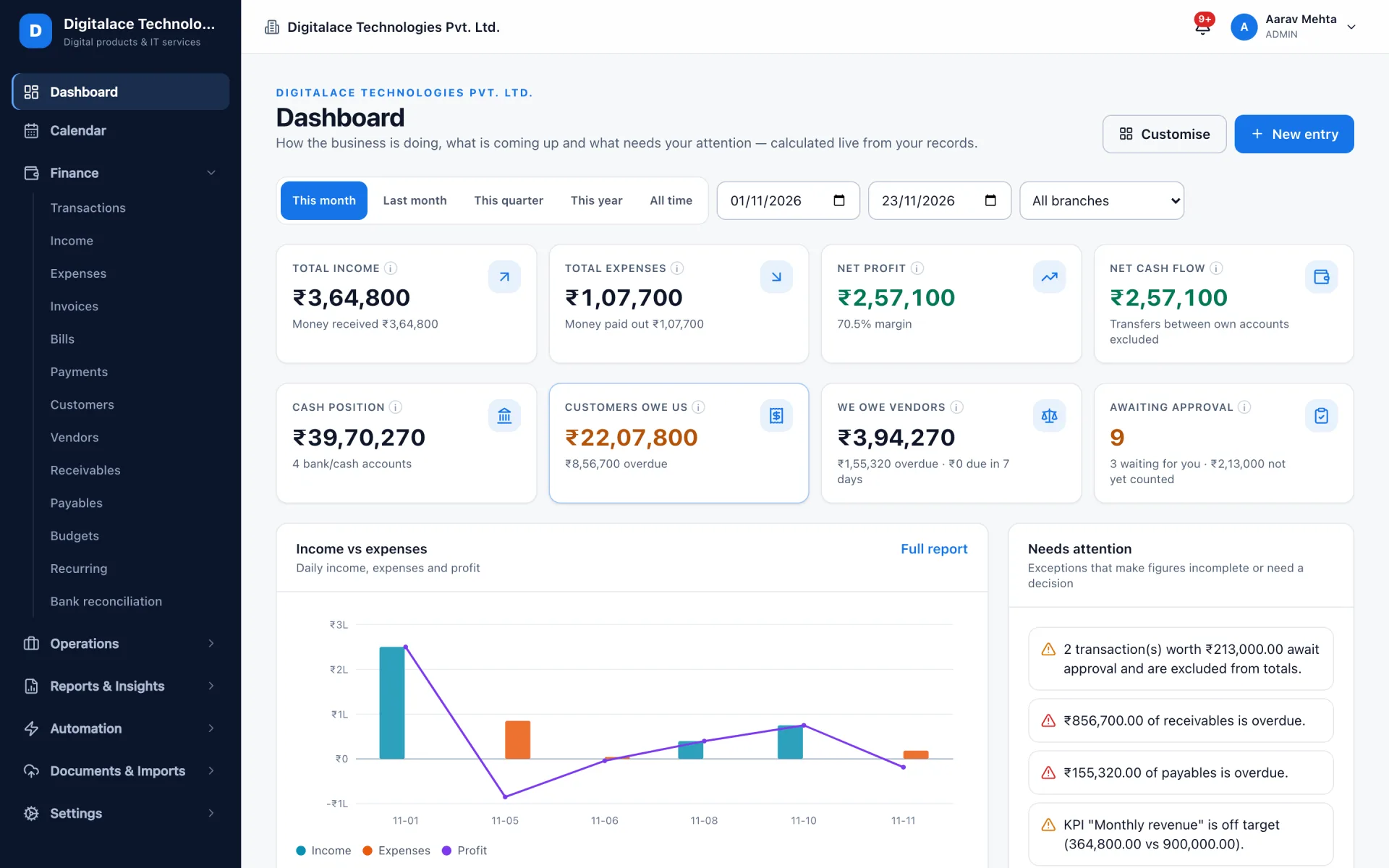
Income, expenses, net profit, net cash flow, cash position, receivables, payables and items awaiting approval. Filter by period preset, custom dates or branch, and see charts by category, branch and project.
Business benefit: Leadership sees the current position and the exceptions that need a decision on one screen.
Business calendar
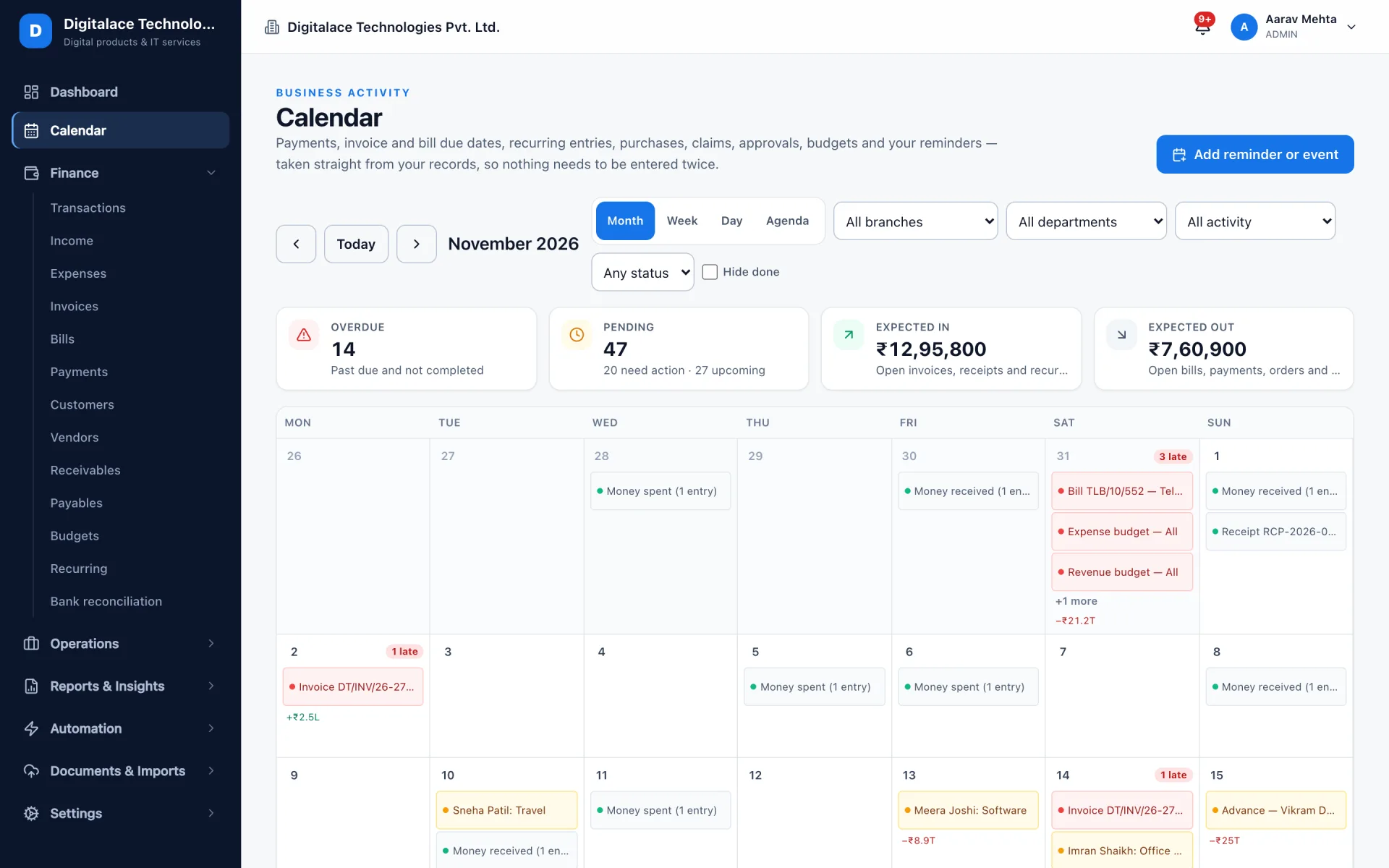
Month, week, day and agenda views of invoice and bill due dates, receipts, payments, recurring entries, PO deliveries, claims, approvals, budget reviews and your own reminders. Filter by branch, department, activity and status.
Business benefit: Upcoming money in and out, and anything overdue, is visible before it is missed. Nothing is entered twice.
Ledger & bank reconciliation
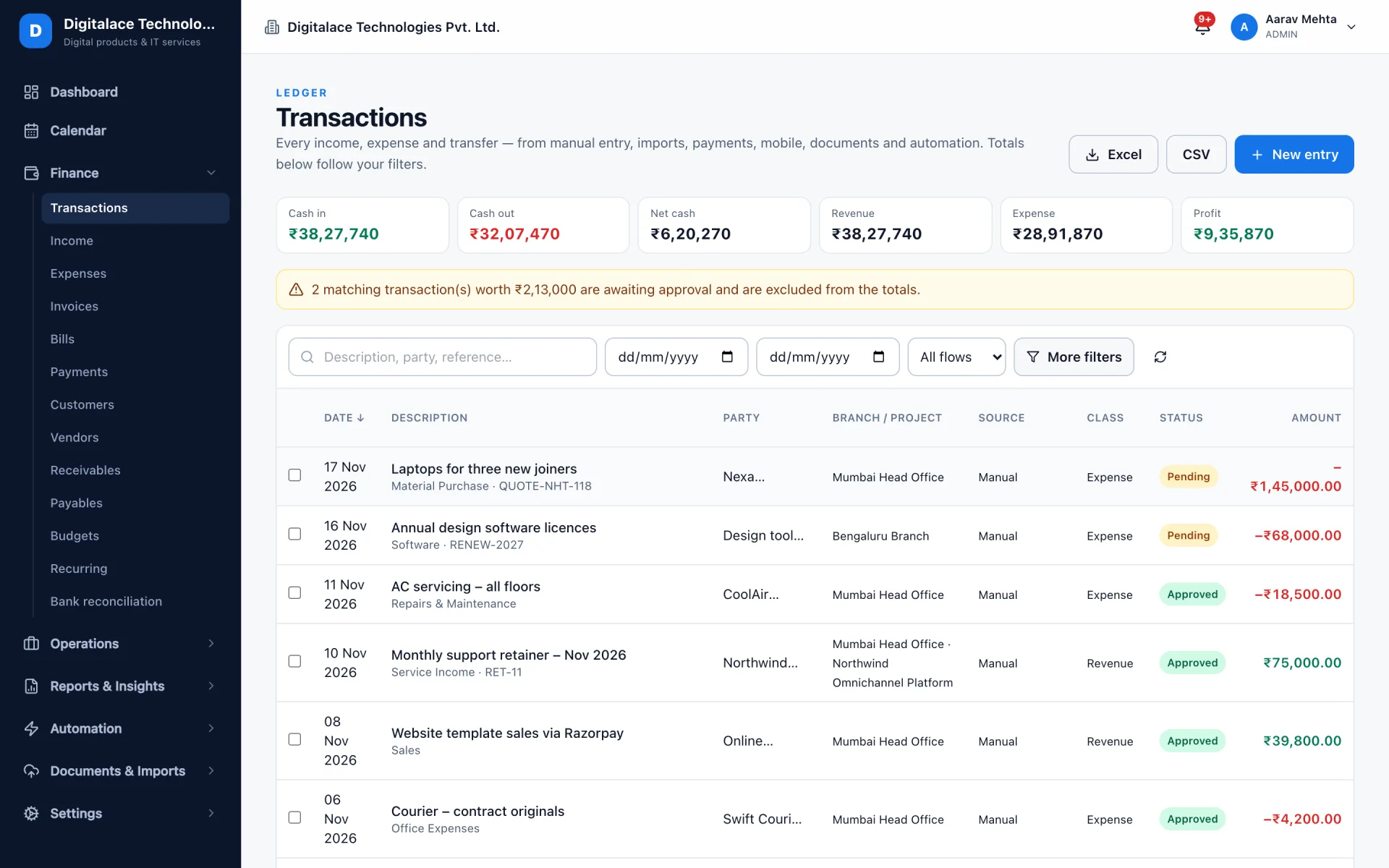
One ledger for income, expenses and transfers from manual entry, imports, payments, mobile, documents and automation. Search and filter it, export to Excel or CSV, categorise in bulk and reconcile bank accounts.
Business benefit: Every figure in every report traces back to a single, filterable list of transactions.
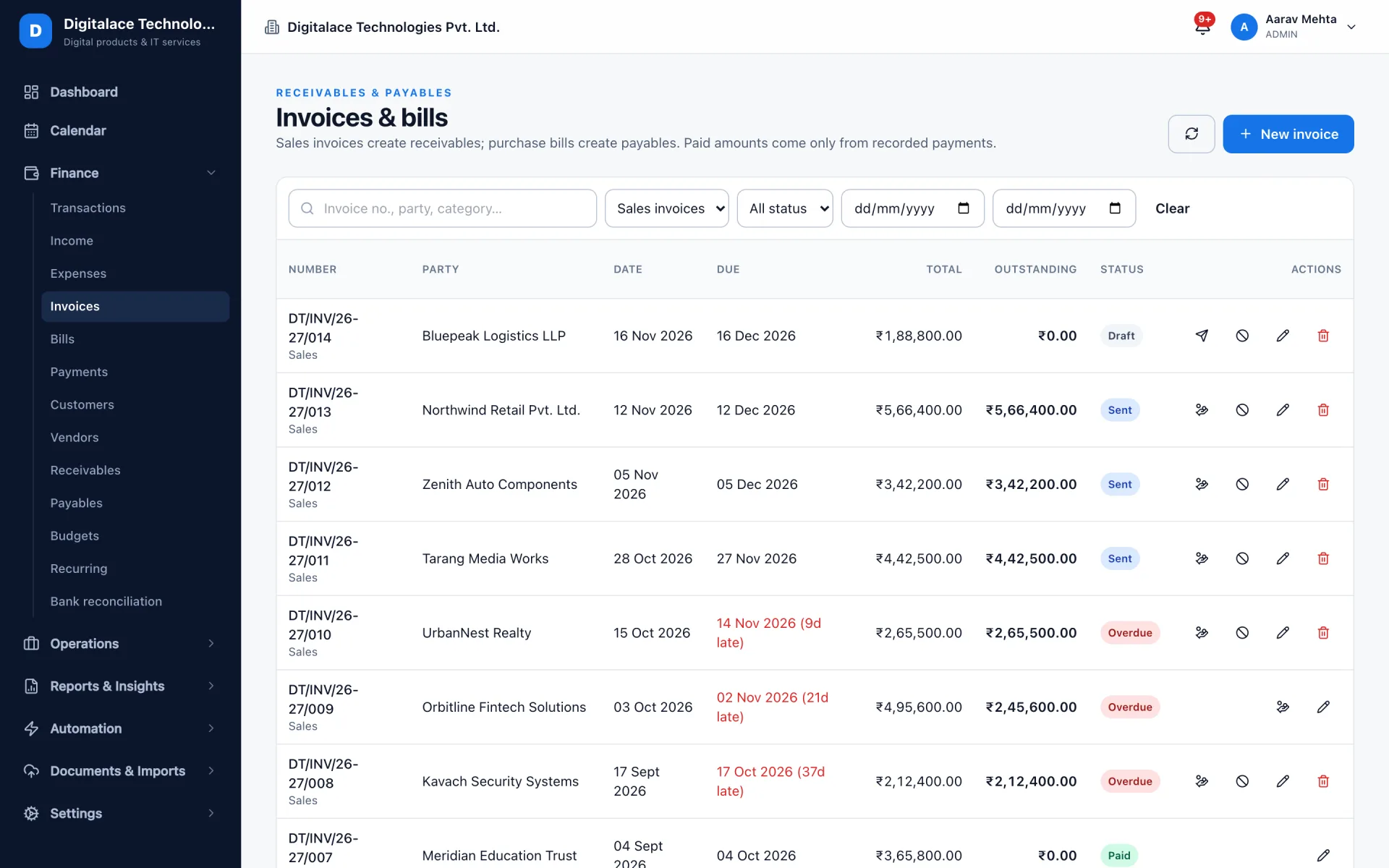
Invoices, bills & payments
Sales invoices and purchase bills with customers and vendors, payment terms, credit limits and GST details. Record full or part receipts and payments, and view customer statements and recurring transactions.
Business benefit: Receivables and payables stay accurate because paid amounts come only from recorded payments.
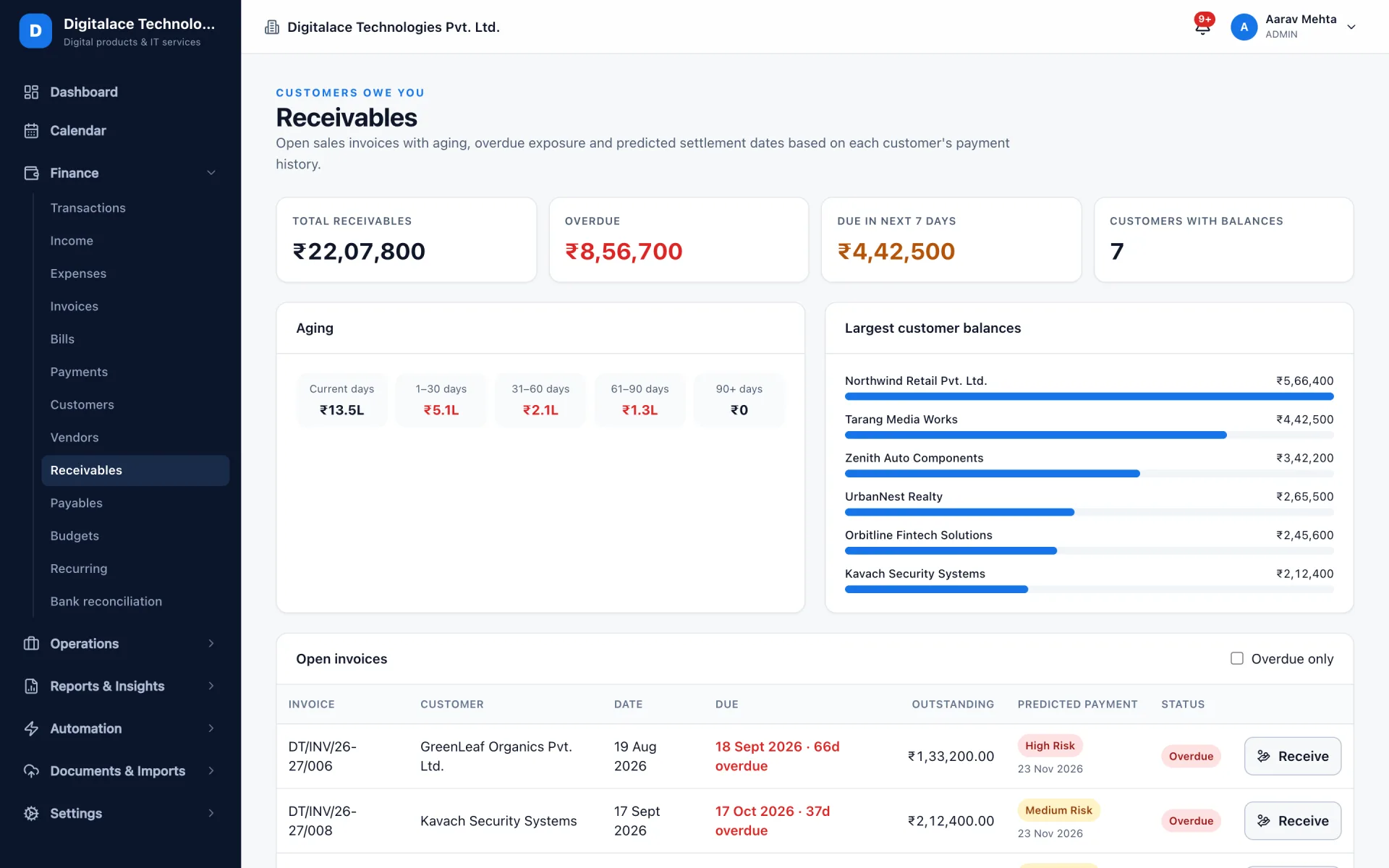
Receivables, payables & budgets
Ageing buckets, largest balances and a predicted payment date with a risk level for each open invoice. Budgets by category, branch, department or project are compared with actuals.
Business benefit: Collections and spending can be prioritised on evidence rather than memory.
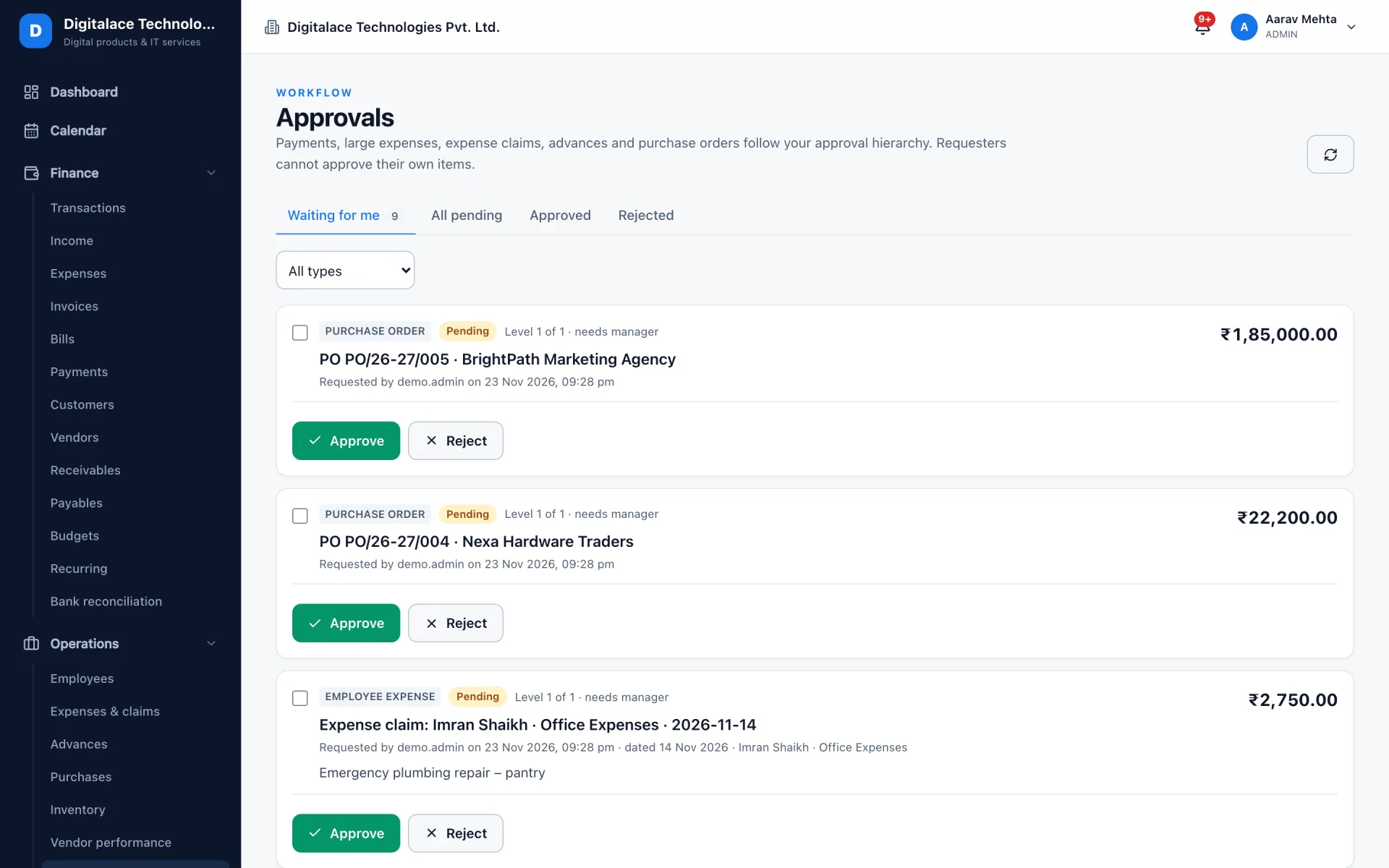
Multi-level approvals
An approval hierarchy by module and amount covers payments, large expenses, expense claims, advances and purchase orders. Requesters cannot approve their own items, and unapproved transactions stay out of the totals.
Business benefit: Spending is controlled by agreed limits, with a record of every decision.
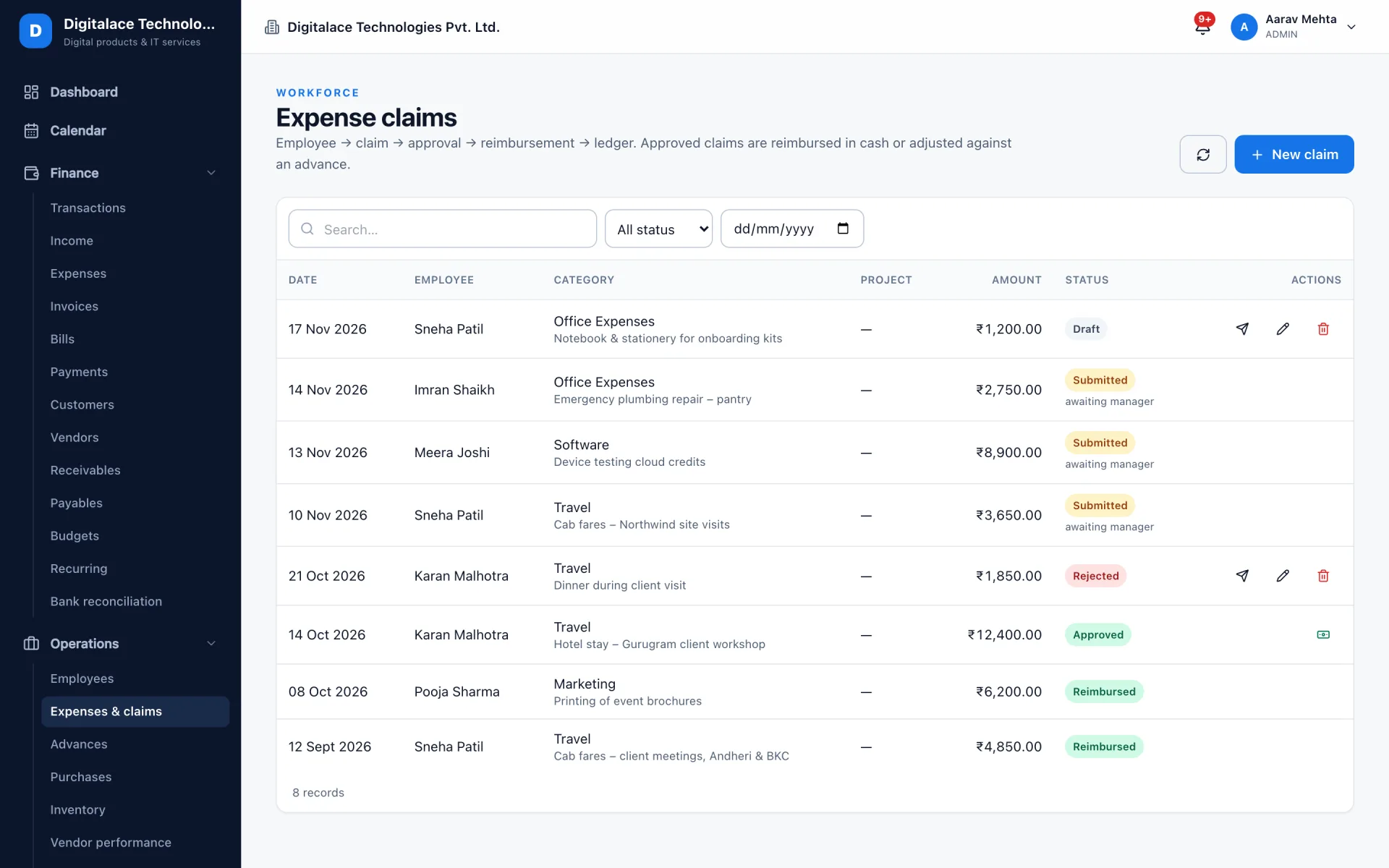
Expense claims & advances
Employees submit claims and advance requests. Managers approve them, and approved claims are reimbursed or adjusted against an advance before posting to the ledger.
Business benefit: Staff expenses follow one tracked process instead of paper or chat.
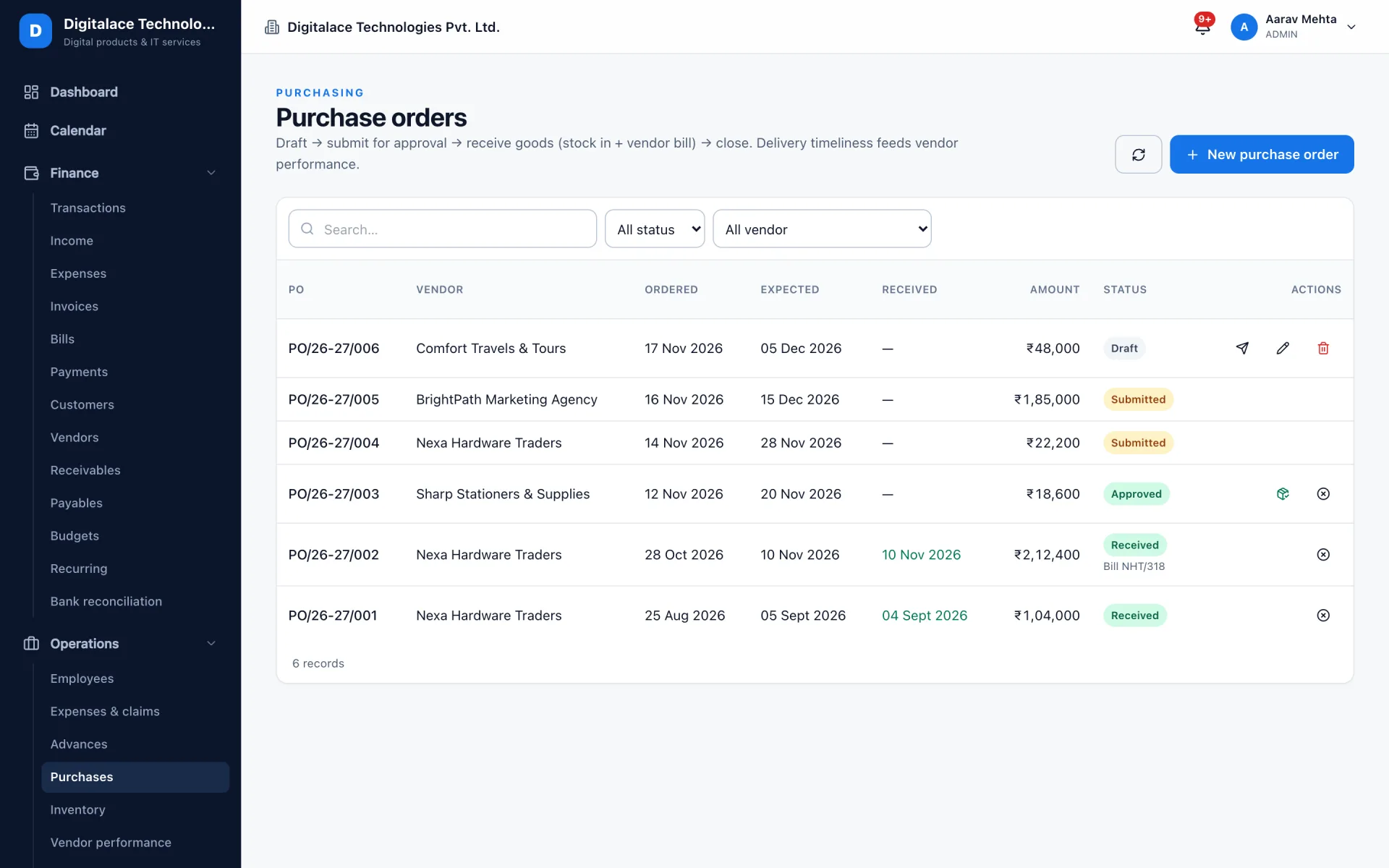
Purchase orders & vendor performance
Raise a PO, send it for approval, receive goods (stock in plus the vendor bill) and close it. Delivery timeliness feeds vendor performance scorecards.
Business benefit: Purchases are approved before they are made, and supplier reliability is measured.
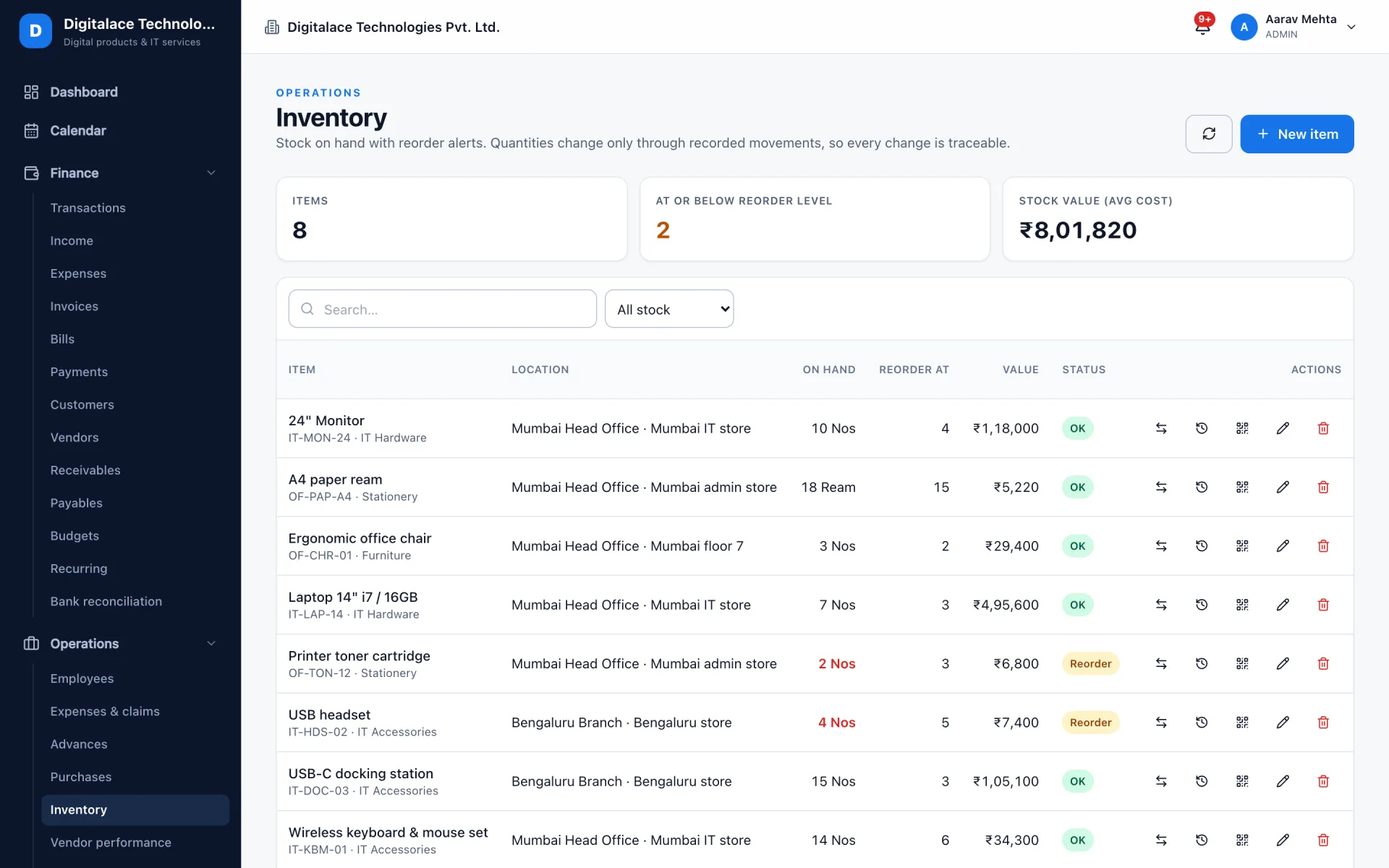
Inventory
Stock items by location with reorder levels, a low-stock filter, average-cost valuation and movement history. Quantities change only through recorded movements.
Business benefit: Stock levels and value are traceable, and reorders are flagged early.
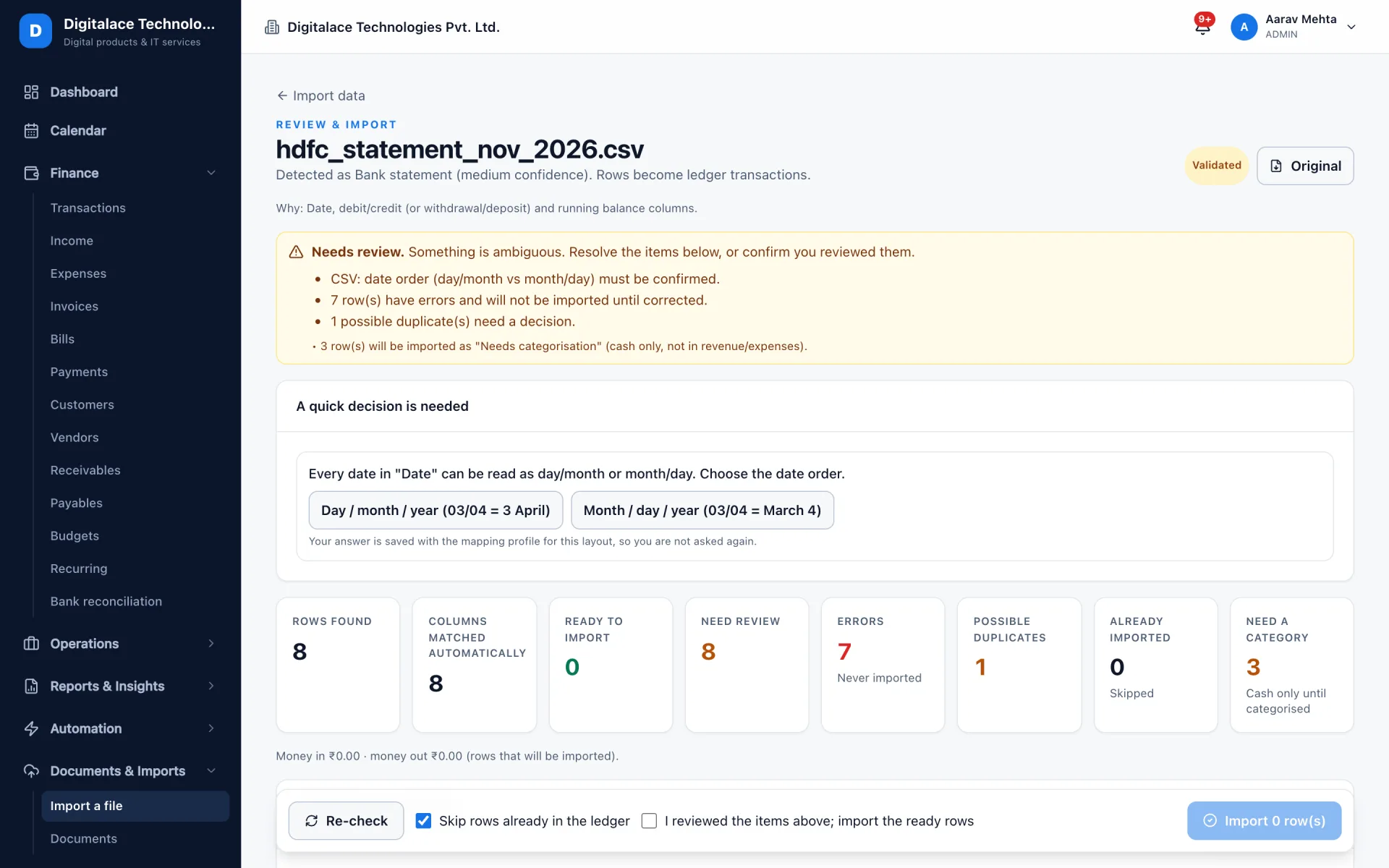
Smart file import & documents
Upload bank statements, cash books, Tally/ERP ledger exports, or income, expense or invoice registers as CSV, Excel, Word or PDF. RDS MIS detects the document, maps columns, checks running balances and flags duplicates. Text-PDF bills can be turned into vendor bills.
Business benefit: Existing data comes in without retyping, and nothing is counted twice.
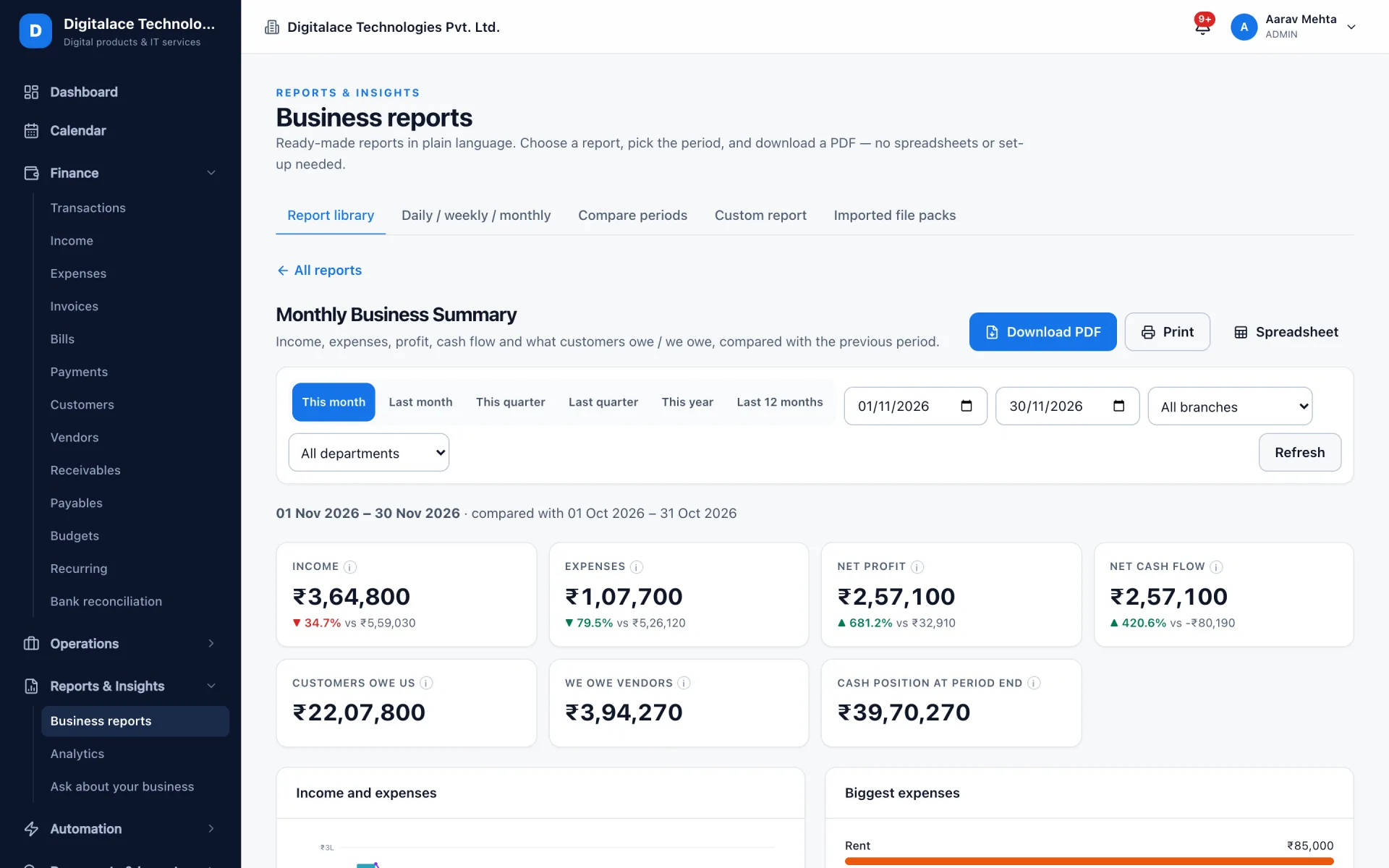
Ready-made business reports
22 reports phrased as questions, including monthly summary, profit & loss, cash flow, receivables, payables, expense breakdown, tax summary, branch performance and budget vs actual. Pick a period, compare with the previous one, and download a PDF or print. Custom and compare-period reports are also available.
Business benefit: Month-end and management reporting take minutes instead of a rebuilt spreadsheet.
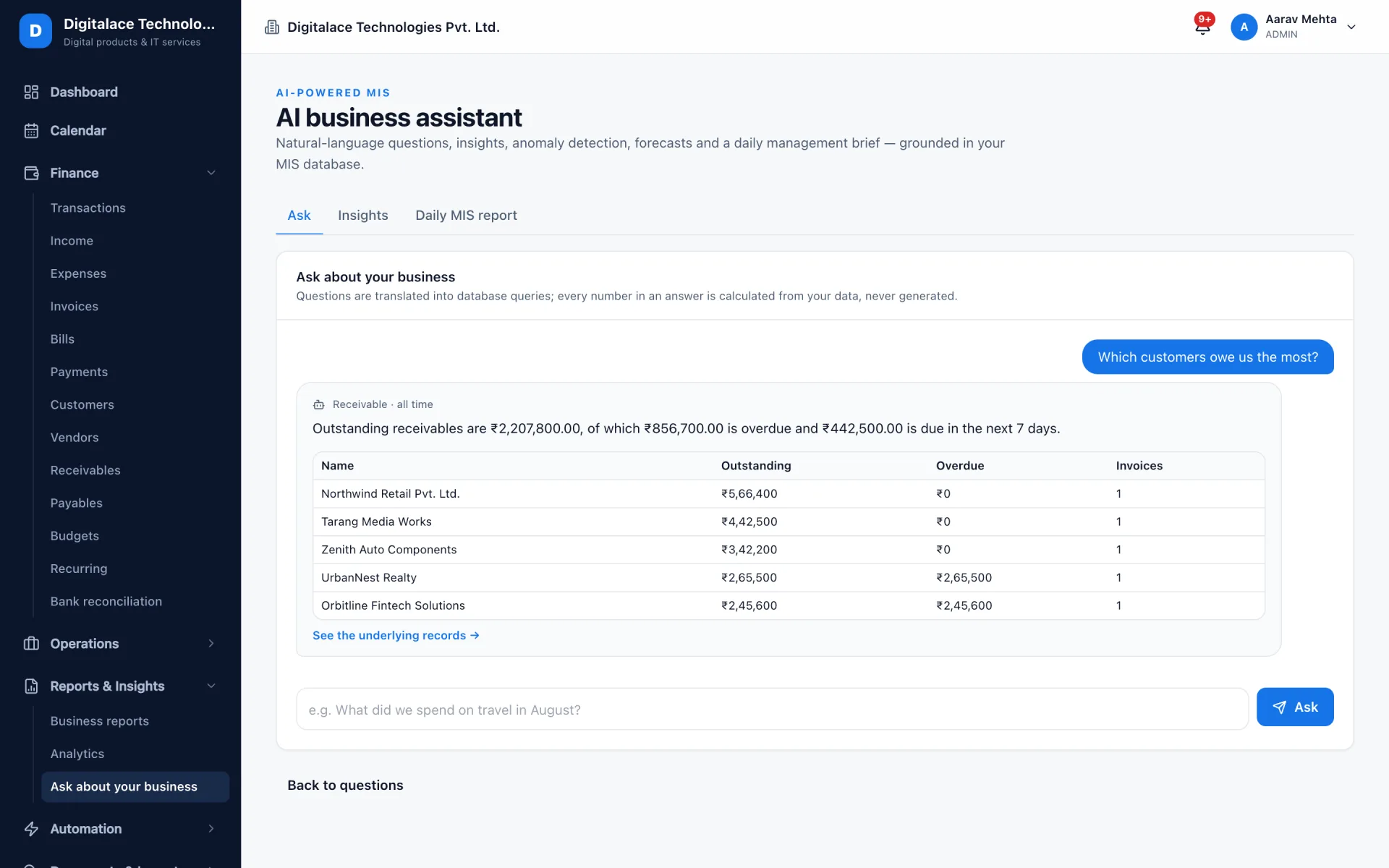
Analytics & business assistant
Executive analytics with forecasts, anomalies, KPI targets and alerts. A business assistant answers questions such as “Which invoices are overdue?” from the database, with a link to the records.
Business benefit: Managers get answers without building a report, and every number is calculated from the data.
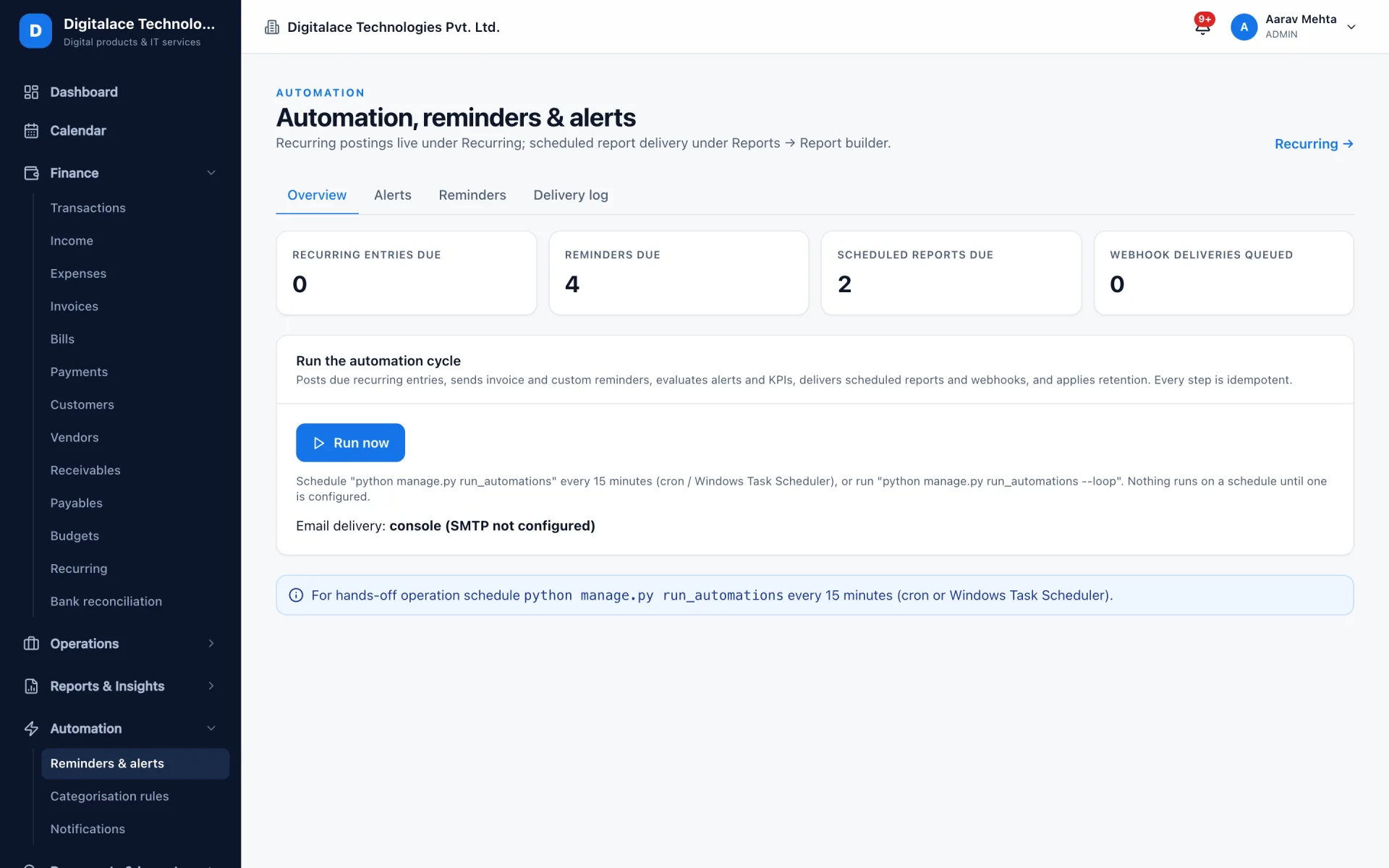
Automation, reminders & alerts
Recurring transactions, payment and custom reminders, alert rules (overdue invoices, low cash, low stock, pending approvals, budget overrun), scheduled reports, categorisation rules and webhooks. They run when you schedule the automation cycle.
Business benefit: Routine follow-ups and postings happen on time without someone remembering them.
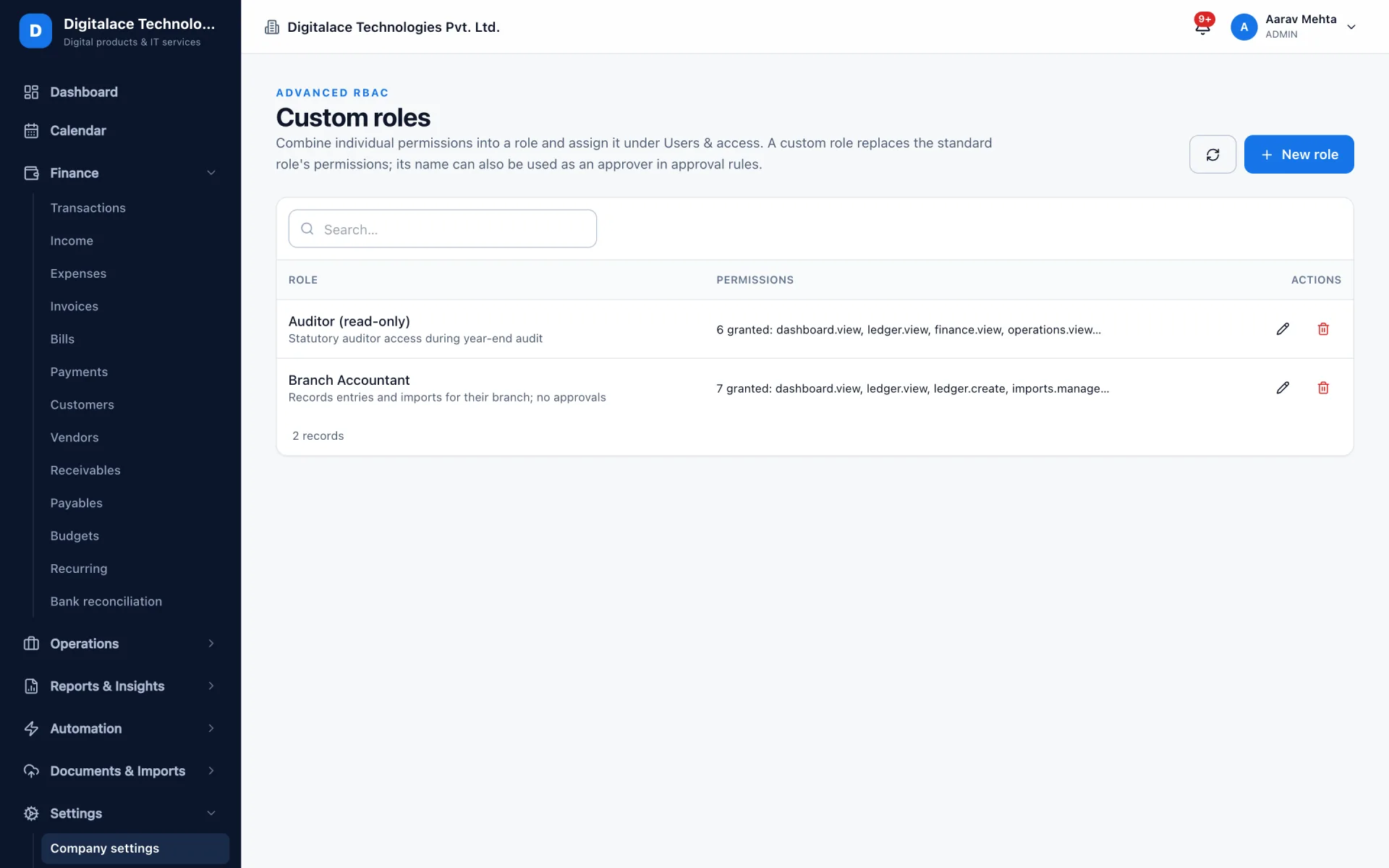
Companies, branches & roles
Multiple companies with separated data, plus branches, departments and projects. Standard roles are admin, manager, approver, analyst, employee and viewer. Custom roles and branch restrictions are available, along with passkey sign-in and company single sign-on (OIDC).
Business benefit: Each person sees and does only what their role allows, across every company and branch.
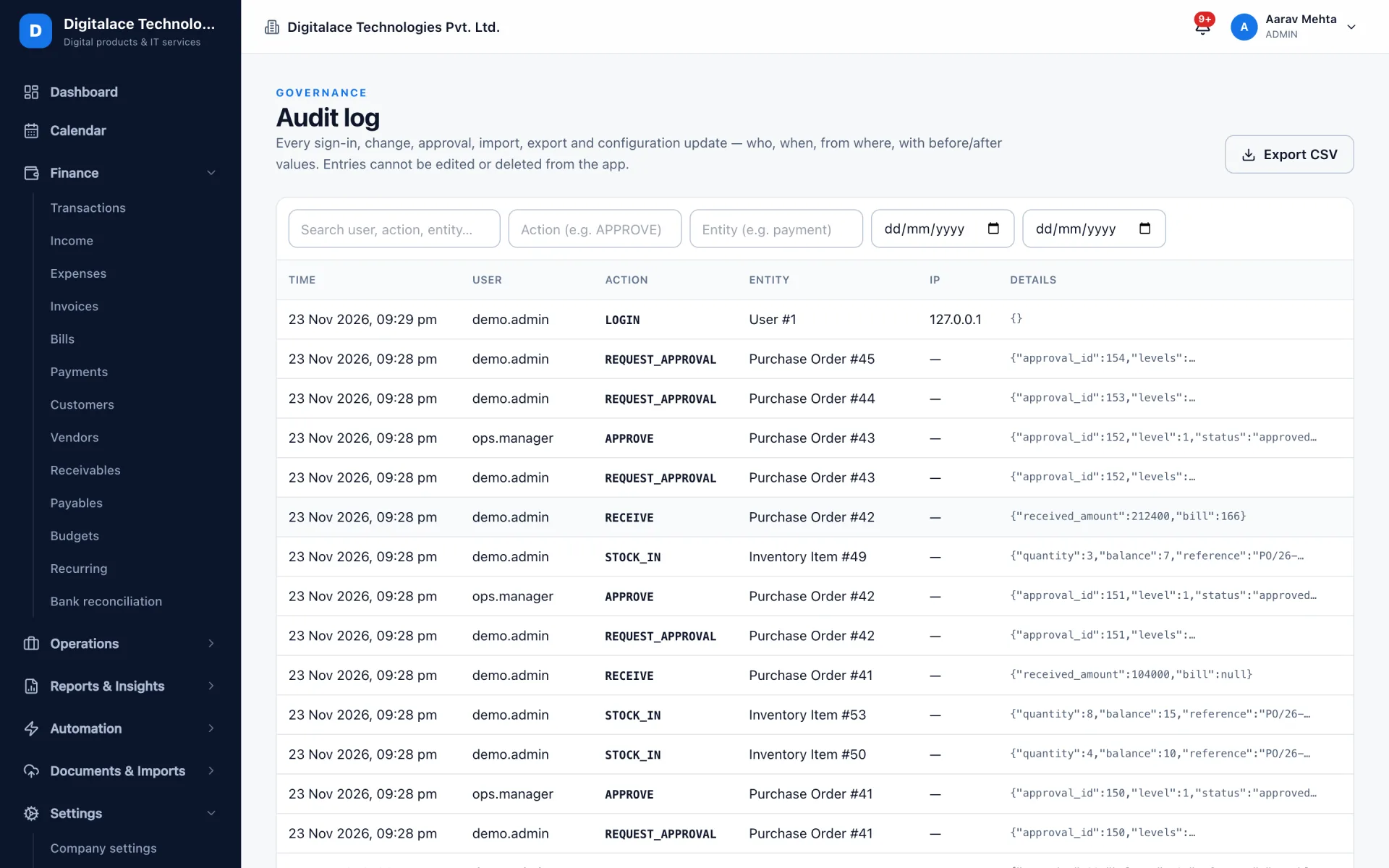
Audit log & backups
Sign-ins, changes, approvals, imports, exports and settings updates are recorded with user, time and details, and can be exported to CSV. Admins can download and restore a JSON backup of company data.
Business benefit: Supports internal control and audit with a record that cannot be edited from the app.
APPLICATION SCREENSHOTS
The real product, screen by screen.
Captured from the running application with a fictional demo company. No customer data is shown.
Business dashboardIncome, expenses, profit, cash position, receivables, payables and pending approvals for the selected period and branch, with a list of items that need attention. Business calendarInvoice and bill due dates, receipts, payments, expense claims, budget reviews and reminders on one calendar, built from the records themselves. Transactions ledgerEvery income, expense and transfer with its source, branch, project, class and approval status. Pending items are kept out of the totals. Invoices & billsSales invoices create receivables and purchase bills create payables. Paid amounts come only from recorded payments. Receivables ageingAgeing buckets, the largest customer balances and a predicted payment date with a risk level for each open invoice. Payables ageingOpen vendor bills with ageing, largest vendor balances and due dates, so payments can be planned. Budget vs actualMonthly revenue and expense budgets by category, branch, department or project, compared with approved actuals. Approval queuePurchase orders, expense claims, advances, payments and large expenses waiting for a decision, with the approval level each one needs. Expense claimsEmployee claims move from draft to submitted, approved and reimbursed, with every step recorded. Purchase ordersPurchase orders go from draft to approval to goods received, which adds stock and creates the vendor bill. InventoryStock on hand by location, reorder levels and average-cost valuation. Quantities change only through recorded movements. Import reviewAn uploaded bank statement is recognised automatically. Unclear dates, errors and possible duplicates are raised as questions before anything is imported. Business reports libraryReady-made reports written as questions, such as “Which customers owe us money?” and “Where is my money going?”. Monthly business summaryKey figures compared with the previous period, with period presets, branch and department filters, PDF download and print. Analytics & KPIsAn executive view with a 12-month trend, budget variance and KPI targets marked on track or in breach. Business assistantQuestions in plain English are answered from the database, with a link to the records behind every figure. Automation & remindersRecurring entries, reminders, alerts, scheduled reports and webhooks are run by one automation cycle. Custom rolesCustom roles combine individual permissions, for example a read-only auditor or a branch accountant. Audit logSign-ins, changes, approvals, imports and exports with who, when and the details. Entries cannot be edited or deleted from the app.
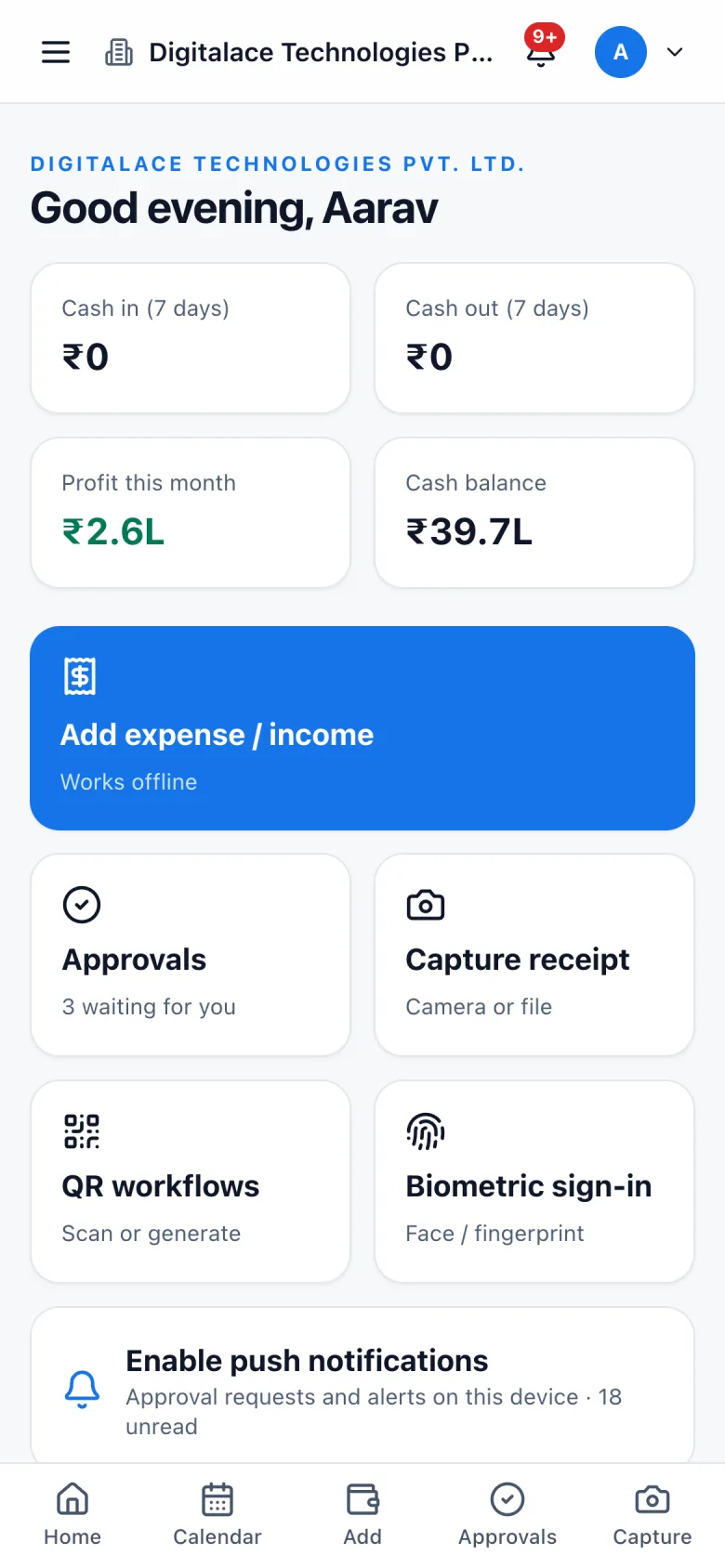
ON THE PHONE
Mobile workspace
A phone layout with quick expense and income entry (designed to work offline and sync later), approvals, receipt capture by camera or file, QR workflows and push notifications.
Approvals and expense capture don't wait for someone to be at a desk.
HOW IT WORKS
From setup to decisions in five steps.
Set up the company
Add the company, branches, departments, projects, bank and cash accounts, categories, users, roles and approval rules.
Bring in the data
Enter transactions, raise invoices and bills, or import bank statements and accounting exports. Unclear rows are reviewed before they are committed.
Run daily operations
Employees submit claims and advances, teams raise purchase orders and receive stock, and payments and receipts are recorded against invoices and bills.
Approve and control
Items above the configured limits go to the right approver. Pending items stay out of the totals until approved, and every action is logged.
Review and decide
Use the dashboard, calendar, budgets, analytics and ready-made reports, by period, branch or department, and download or print them.
BUSINESS BENEFITS
What changes for your team.
These are practical benefits that follow from how the product works. Results depend on your data and processes.
One source of truth
Ledger, invoices, claims, purchases and stock are linked, so reports and dashboards agree with each other.
Less manual work
File import, categorisation rules, recurring entries and ready-made reports replace much of the copy-paste and spreadsheet rebuilding.
Better visibility
Cash, receivables, payables, budgets and upcoming dues are visible by company, branch, department and project.
Stronger control
Approval limits, role-based permissions, branch restrictions and an audit log show who did what and when.
Organised reporting
Consistent reports with previous-period comparison, PDF download and print, ready for owners, directors and auditors.
Faster decisions
The needs-attention list, KPI alerts and business assistant highlight what needs action now.
WHO CAN USE RDS MIS?
Built for the people who run the numbers.
Owners & directors
See income, profit, cash, what customers owe and what is due, for the whole company or one branch, without waiting for a spreadsheet.
Finance & accounts teams
Record and import transactions, raise invoices and bills, reconcile bank statements and produce reports from one ledger.
Managers & approvers
Approve payments, purchase orders, expense claims and advances at the right level, on desktop or phone.
Employees
Submit expense claims and advances, capture receipts and track reimbursement status.
Auditors & analysts
Read-only or analyst access to reports, analytics and a full audit trail.
A good fit for
- Professional and IT services firms
- Trading and distribution businesses
- Multi-branch businesses
- Agencies and project-based companies
- Growing SMEs moving off spreadsheets
Platform
- Web application
- Runs in the browser on desktop, with a dedicated mobile layout for phones.
- Backend
- Django and Django REST Framework API, with session authentication, CSRF protection and API keys.
- Frontend
- Next.js and React interface, served from the same origin as the API.
- Database
- SQLite by default, or PostgreSQL for production deployments.
Good to know before you start
- Scheduled automation (recurring entries, reminders, alerts and scheduled reports) runs only after a scheduler is configured for the automation command.
- OCR for scanned PDFs and photos needs the free Tesseract OCR program installed on the server. Text PDFs, CSV, Excel and Word files work without it.
- Email notifications need an SMTP server, and push notifications need VAPID keys.
- Connectors for Tally, Zoho Books, QuickBooks, Google Sheets, Razorpay, Stripe, GST and WhatsApp Business need the customer's own provider credentials before they can be used.
FAQ
Questions about RDS MIS.
What is RDS MIS?
RDS MIS is a web-based management information system from RDS Innovations. It keeps your ledger, invoices and bills, payments, approvals, expense claims, purchase orders and inventory in one place, and produces dashboards, a business calendar, analytics and ready-made reports from those records.
What business problems does RDS MIS solve?
It replaces scattered spreadsheets, statements and email approvals with one system. Cash, profit, receivables and payables are visible by branch and period, spending follows approval limits, overdue items are flagged, and management reports are produced without rebuilding them by hand.
Which modules are available?
Dashboard, business calendar, transactions ledger, invoices and bills, payments, customers and vendors, receivables and payables, budgets, recurring transactions and bank reconciliation. Also employees, expense claims, advances, purchase orders, inventory, vendor performance and approvals. Plus business reports, analytics, a business assistant, automation and reminders, file import and documents, integration settings, audit log, settings and a mobile workspace.
Does it support multiple user roles?
Yes. The standard roles are admin, manager, approver, analyst, employee and viewer, each with its own permissions. Admins can also create custom roles from individual permissions and restrict users to specific branches.
Who can access the system?
Only users your administrator adds to the company, with the role and branches they are given. Sign-in is by username and password, with optional passkeys and company single sign-on (OIDC) when configured. There is no public setup page.
Can it handle more than one company or branch?
Yes. Data is separated by company, and each company can have branches, departments and projects. Dashboards and reports can be filtered by branch and department.
Can we import our existing data?
Yes. RDS MIS imports bank statements, cash books, Tally/ERP ledger exports, and income, expense and invoice registers from CSV, Excel, Word and text-PDF files. It flags duplicates and unclear rows for review. Scanned documents need OCR to be installed on the server.
Can the software be customised?
Many settings are configurable inside the product, including categories, approval rules, custom roles, branding, KPIs, alerts and scheduled reports. For changes beyond configuration, contact RDS Innovations to discuss your requirements.
How is RDS MIS deployed?
It is a web application with a Django backend and a Next.js frontend, using SQLite or PostgreSQL. Contact RDS Innovations for current hosting and deployment options.
How can we request a demo, and what support is available?
Use the Request a Demo button on this page or the contact form, and choose RDS MIS as the product. The team will arrange a walkthrough. For pricing, support and onboarding details, contact RDS Innovations directly.
GET STARTED
Ready to simplify your business operations?
Discover how RDS MIS can support your business workflows and management requirements.